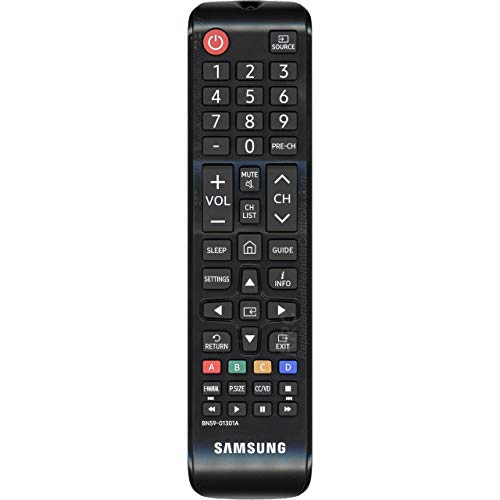
The Samsung BN59-01301A and BN59-01303A LED TV remote control is a replacement remote intended for select Samsung televisions from the 2018 model year. It is designed for everyday TV control, including basic navigation, channel and volume adjustment, and menu access on compatible sets. For households replacing a lost or worn remote, the main point to check is model compatibility, since remote controls are often tied to specific TV series and model numbers.
Quick Overview
This Samsung remote is meant for a defined group of Samsung LED televisions, including N5300, NU6900, NU7100, and NU7300 models. It does not require programming. The remote uses two AAA batteries, which are not included. In practical terms, that makes it a straightforward replacement option for users who want a remote that works after the batteries are installed, without additional setup steps.
| Product Type | LED TV remote control |
|---|---|
| Brand | SAMSUNG |
| Compatibility | Select Samsung 2018 TV models, including N5300, NU6900, NU7100, and NU7300 series models |
| Battery | 2 x AAA batteries, not included |
| Setup | No programming required |
| Equipment Type | Original factory equipment |
What This Remote Is Designed For
The BN59-01301A and BN59-01303A remote is made for Samsung televisions that use this specific remote family. It is not a universal remote in the broad sense, even though some replacement remotes use similar model numbers. The product is intended for several Samsung LED TV models from 2018, and compatibility is the most important factor before purchase.
For many TV owners, a replacement remote is needed because the original has been lost, damaged, or stopped working properly. In those cases, a direct replacement can be useful because it avoids the learning curve of a programmable universal remote. This Samsung remote is positioned as a ready-to-use option for matching televisions.
Compatible TV Models
The compatible models listed for this remote include several screen sizes within the Samsung N5300, NU6900, NU7100, and NU7300 families. Models named in the product information include:
- UN32N5300, UN32N5300AF, UN32N5300AFXZA
- UN43NU6900, UN43NU6900FXZA
- UN50NU6900, UN50NU6900FXZA, UN50NU7100, UN50NU7100F, UN50NU7100FXZA
- UN55NU6900, UN55NU6900FXZA, UN55NU7100, UN55NU7100F, UN55NU7100FXZA
- UN55NU7300, UN55NU7300FXZA
- UN65NU7100, UN65NU7100F, UN65NU7100FXZA
- UN65NU7300, UN65NU7300FXZA
- UN75NU7100, UN75NU7100F, UN75NU7100FXZA
Because remote compatibility can vary even between closely named televisions, the exact model number on the TV label is worth checking carefully. That is especially important if the TV has a regional suffix or a slightly different model code.
Setup and Everyday Use
One of the main practical features of this remote is its simple setup. It requires no programming. After inserting two AAA batteries, it is ready for use on compatible televisions.
That makes it suitable for common day-to-day tasks such as:
- Turning the TV on and off
- Changing channels
- Adjusting volume
- Navigating on-screen menus
- Selecting inputs or sources on the TV
For most users, the value of a replacement remote is convenience rather than advanced functionality. A direct replacement like this one is designed to restore normal TV operation with minimal effort, especially in living rooms, bedrooms, or other spaces where a simple remote is easier than using on-screen controls.
Design and Product Role
The available product details identify this remote as original factory equipment. That is useful for buyers who prefer a replacement that matches the intended remote style for the supported Samsung models. The product information does not provide details about materials, dimensions, or special finishes, so those aspects should be checked if they matter for handling or appearance.
For remote controls, design usually matters less in a technical sense than in a practical one. Users often care about whether the buttons are familiar, whether the remote feels easy to hold, and whether it responds without setup. Since no additional construction details are provided, those broader comfort factors cannot be confirmed here.
Why Compatibility Matters
TV remotes often look similar across model lines, but that does not guarantee they will work with a given television. This is why the compatibility list matters more than the general shape of the remote. The Samsung BN59-01301A and BN59-01303A remote is tied to specific 2018 Samsung LED TV model numbers, not to every Samsung television.
If your TV model is not on the compatibility list, it is worth verifying the exact model number before assuming this remote will work. This is especially important for users replacing a remote for a TV purchased several years ago, since similar series names can include multiple variants.
Things to Check Before Buying
Several practical details are worth confirming before choosing this remote:
- TV model number to confirm direct compatibility
- Battery type, since two AAA batteries are required
- Whether you want original factory equipment rather than a generic substitute
- Physical fit and button layout preferences if you are replacing a remote you used regularly
Because the remote is designed as a straightforward replacement, it may be most useful for users who want the simplest path back to normal TV control. It may be less relevant for anyone who needs broader device compatibility or a universal remote with extra setup options.
Who It May Be Suitable For
This Samsung remote may be suitable for:
- Owners of compatible Samsung 2018 LED TVs who need a direct replacement remote
- Users who want no-programming setup
- Households replacing a missing original remote
- People who prefer a model-specific remote over a universal alternative
It may be less suitable for users who are unsure of their TV model or who need one remote for multiple brands and devices. In those cases, a different remote type may be more practical.
Related Product Types
Replacement TV remotes generally fall into three broad groups. A model-specific remote like this one is intended for a defined set of televisions. A brand-compatible universal remote may work across a wider range of TVs, but it can require more checking. A fully universal remote may support multiple device types, though it may not match the original remote behavior as closely.
For users of the supported Samsung sets, a model-specific replacement often keeps the process simple. For users with mixed-brand devices, a universal option may be more convenient, but that is a different use case.
For the latest product information and specifications, view the current product listing.
Frequently Asked Questions
Does this remote need programming?
No. The remote does not require programming. It is ready for use after two AAA batteries are installed.
Which TVs is it made for?
It is intended for select Samsung 2018 LED TV models, including N5300, NU6900, NU7100, and NU7300 series models. Exact compatibility should be checked against the TV model number.
Are batteries included?
No. The remote uses two AAA batteries, and they are not included.
Is this an original Samsung remote?
The product information identifies it as original factory equipment.
Can it be used with any Samsung TV?
No. It is tied to specific compatible Samsung model numbers, so it should not be treated as a universal remote for all Samsung televisions.
Final Thoughts
The Samsung BN59-01301A and BN59-01303A LED TV remote control is a simple replacement option for owners of compatible Samsung 2018 televisions. Its main strengths are direct model-specific compatibility, no programming requirement, and battery-based operation with two AAA cells. For anyone replacing a lost or nonworking remote on one of the supported TV models, it is a straightforward product to compare against other replacement options.