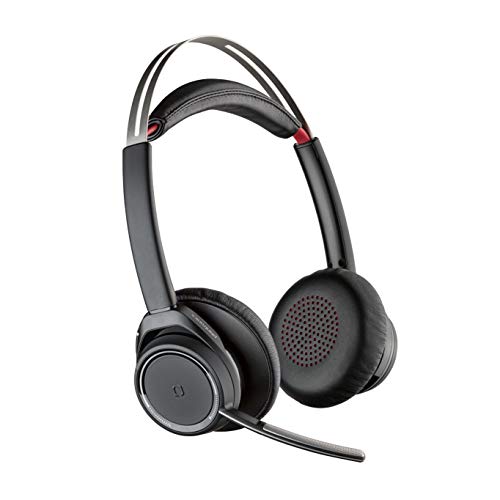
The Plantronics Voyager Focus UC is a dual-ear Bluetooth headset built for calls, meetings, and focused computer work. It combines a boom microphone, active noise canceling, and USB-A connectivity for PC and Mac use. The headset is also certified for Microsoft Teams and compatible with other collaboration and voice platforms, which makes it a practical option for people who spend much of the day on calls or video meetings.
For home offices, shared workspaces, and other distracting environments, this headset is designed to help separate the call from the background. The over-the-ear stereo design is intended to keep both ears covered, while the noise canceling features are meant to reduce distractions on both ends of the conversation.
Quick Overview
The Voyager Focus UC is a wireless stereo headset with a boom mic that connects through USB-A to a computer and can also work with a mobile phone. Its main strengths are active noise canceling, multiple noise canceling microphones, and a design aimed at professional communication. It also includes talk-time and listening-time ratings that help set expectations for daily use.
| Product Type | Bluetooth dual-ear stereo headset with boom mic |
|---|---|
| Brand | Plantronics |
| Connectivity | USB-A for PC and Mac, mobile phone |
| Compatibility | Microsoft Teams certified, compatible with other collaboration and voice platforms |
| Noise Control | Active Noise Canceling, three noise canceling microphones |
| Talk Time | Up to 12 hours, or 10 hours with ANC on |
| Listening Time | Up to 15 hours, or 12 hours with ANC on |
| Wireless Range | Up to 98 feet, 30 meters |
What This Headset Is Designed to Do
This model is built for voice communication rather than casual listening alone. The boom microphone and dual-ear style point toward frequent calls, meetings, and computer-based work. Because it connects with USB-A, it fits a straightforward desk setup on many PCs and Macs without requiring a more specialized connection.
The headset also supports mobile phone use, which can be helpful if someone switches between computer meetings and phone calls during the day. That kind of flexibility is often useful in hybrid work settings, where a headset may move between a desk, a home office, and occasional mobile use.
Noise Canceling and Call Focus
One of the main features here is active noise canceling. In practical terms, ANC is meant to reduce surrounding noise before it reaches your ears, which can make it easier to concentrate on a call or meeting. That may be especially useful in open offices, homes with activity in the background, or workspaces where ambient noise is difficult to avoid.
The headset also uses three noise canceling microphones to help reduce what the other caller hears from your environment. For voice calls, that matters as much as what you hear. A headset can sound clear to the wearer but still transmit a busy room to the person on the other end. The microphone setup in the Voyager Focus UC is aimed at limiting that issue.
Because the product uses a boom mic, the microphone sits closer to the mouth than a typical inline or built-in microphone. That arrangement is common in office headsets because it helps keep the microphone in a consistent position during calls.
Connectivity for Workday Setups
The Voyager Focus UC connects to a computer through USB-A. That makes it a straightforward option for desktop or laptop setups that still use a standard USB-A port. If your work machine relies on USB-C only, you would need to confirm whether an adapter or dock fits your setup.
The headset also supports mobile phone connection. That can be useful for people who take calls on multiple devices or who want to keep one headset ready for both computer meetings and phone conversations.
It is certified for Microsoft Teams and compatible with other leading collaboration and voice platforms. For day-to-day use, that kind of compatibility matters because many professionals want a headset that integrates cleanly with the software they already use. It is still worth checking device and application compatibility if your setup is unusual, but the intended use is clear: office communication across common platforms.
Battery Life and Range
The listed talk time is up to 12 hours, or 10 hours with ANC on. Listening time is listed as up to 15 hours, or 12 hours with ANC on. Those figures give a sense of how the headset may fit into a workday, though actual results can vary with volume, call length, and use of noise canceling.
The headset can roam up to 98 feet, or 30 meters. That wireless range may be useful if you step away from your desk during calls, move around a home office, or need to keep talking while handling another task nearby. Walls, furniture, and interference can affect real-world range, so it is better to treat the number as a reference point rather than a guarantee.
How the Design Supports Everyday Use
As a dual-ear stereo headset, the Voyager Focus UC covers both ears, which can help keep attention on the call and reduce outside distractions. This style is commonly chosen by people who want a more immersive communication headset rather than a single-ear office model.
The overall design is built around work sessions rather than casual entertainment. That means the main priorities are comfort during calls, microphone placement, and the ability to focus in a noisy setting. If you spend long stretches in meetings, the stereo format and active noise canceling may be especially relevant.
For people who switch between tasks, the fact that it can connect to a computer and mobile phone adds flexibility. It may suit users who want one headset for video conferencing, voice calls, and general office communication.
Who It May Suit
- Remote workers who take frequent calls from home
- Office professionals in open or noisy environments
- Users who want a headset certified for Microsoft Teams
- People who prefer a dual-ear stereo fit for longer call sessions
- Anyone who needs a USB-A headset for PC or Mac communication
Points to Check Before Buying
Before choosing the Voyager Focus UC, it is worth confirming a few setup details. The headset uses USB-A, so check whether your computer has that port available or whether you rely on USB-C only. If your work setup includes a dock or adapter, make sure it supports the connection you need.
It is also helpful to consider whether you prefer a stereo, over-the-head headset. Some users like the focus of dual-ear headphones for calls, while others prefer a lighter single-ear style for staying aware of their surroundings. This model is aimed at focused communication, not at staying loosely connected to the room around you.
Finally, think about how much wireless range and battery life matter in your routine. The listed talk time and roaming range are suitable references for a workday headset, but your actual use may vary depending on how often you move around, how long your meetings run, and whether ANC is turned on.
Related Use Cases
The Voyager Focus UC fits into a broader category of business communication headsets. Compared with more casual Bluetooth headphones, this type of device gives more emphasis to voice pickup, microphone clarity, and computer integration. Compared with wired office headsets, it offers more mobility and less cable clutter.
That balance can be useful for hybrid work, online meetings, support roles, and any task that depends on clear two-way communication. It is not a general-purpose entertainment headset description, though it can still handle listening tasks within the limits of its work-focused design.
For the latest product information and specifications, view the current product listing.
Frequently Asked Questions
What devices does the Voyager Focus UC connect to?
It connects to a PC or Mac using USB-A and can also connect to a mobile phone. That gives it flexibility for desktop work and phone calls.
Does this headset work with Microsoft Teams?
Yes. It is certified for Microsoft Teams and compatible with other collaboration and voice platforms.
What does active noise canceling do on this headset?
Active noise canceling is designed to reduce surrounding noise for the listener. In this headset, it is paired with three noise canceling microphones to help support clearer calls.
How long can it last on a charge?
The listed talk time is up to 12 hours, or 10 hours with ANC on. The listed listening time is up to 15 hours, or 12 hours with ANC on.
How far can I move from the connected device?
The headset can roam up to 98 feet, or 30 meters. Actual range can vary with the environment and surrounding interference.
Final Thoughts
The Plantronics Voyager Focus UC is a work-focused Bluetooth headset built around voice calls, meeting software, and noise reduction. Its USB-A connectivity, Microsoft Teams certification, active noise canceling, and dual-ear stereo design make it a straightforward option for people who want a dedicated communication headset for PC, Mac, and mobile use.
If the priority is clearer calls in a distracting environment, the combination of ANC, boom microphone design, and wireless movement range gives this model a practical profile. It is most relevant for users who want a communication headset rather than a general listening headset.